Most outreach tests on LinkedIn end in a guess. Version A got 31% acceptance on 200 invites, version B got 28% on 200, and nobody knows whether that means anything.
This guide shows how to run a test that gives a real answer. You'll see what to test, how many invites each version needs, how to split them across senders and when to call a winner. The examples cover two to ten senders.
LinkedIn makes this harder than email. It "limits the number of invitations you can send", and it doesn't publish the number (LinkedIn Help, retrieved 2026-10-25). Every invite you spend on a test is one you can't spend on anything else.
Three terms first. An ideal customer profile (ICP) is the kind of company and person you sell to. An angle is the reason you give that person to talk. A matured invite is one sent long enough ago, such as 14 days, that its answers have had time to come in.
What to test: ICPs and angles, not words
A LinkedIn A/B test compares groups of people on one number. Each group is a test cell: one ICP plus one angle, run as its own campaign. Each cell is one version of the test. You send to every cell in the same way, then compare the cells.
The classic setup is a two-by-two grid. Two ICPs meet two angles, which gives four cells:
| Angle 1: cost | Angle 2: speed | |
|---|---|---|
| ICP A: heads of RevOps at 50–200-person SaaS companies | Campaign "RevOps – cost" | Campaign "RevOps – speed" |
| ICP B: CFOs at the same companies | Campaign "CFO – cost" | Campaign "CFO – speed" |
The names are examples. Each comparison changes one thing. Compare the two ICPs within the same angle, and the two angles within the same ICP.
LinkedIn differs from email testing in three ways:
- Invites are capped per profile. You can't buy more volume by adding a sending domain.
- Results are slow. Acceptances take days, replies take longer, and calls take weeks.
- Every sender is a real person. Each profile carries someone's reputation, so it can't be treated as disposable.
Step 1: Work out how many invites you can spend
Your test budget is the number of senders times the invites each sends a week. A two-by-two test spends the budget four ways, so each cell gets a quarter.
LinkedIn doesn't say what a realistic pace is. Its help pages describe limits and restrictions without a weekly figure (LinkedIn Help, retrieved 2026-10-25).
This guide uses two paces for the arithmetic. The lower one is 125 invites a week per sender, or 25 per working day. The upper one is 200. Treat 200 as a ceiling for planning, not a target: accounts can be restricted below it.
| Senders | Weekly budget at 125 per sender | Weekly budget at 200 per sender | Per cell in a two-by-two test (125 / 200) |
|---|---|---|---|
| 2 | 250 | 400 | 63 / 100 |
| 5 | 625 | 1,000 | 156 / 250 |
| 7 | 875 | 1,400 | 219 / 350 |
| 10 | 1,250 | 2,000 | 313 / 500 |
Tests share these invites with your main campaign, the one that already books calls. Decide up front what share of the week a test may use.
Step 2: Choose the number that decides
Use acceptance to stop clear losers early and replies to pick between angles. Use calls to confirm the winner. Don't wait for calls on every comparison, and don't crown a winner on acceptance alone.
Divide every result by the same thing: invites sent. A positive reply is one that asks for a call or for more information.
| Step | Rate | Divided by |
|---|---|---|
| Accepted | accepted ÷ invites | invites sent, matured |
| Replied | replies ÷ invites | invites sent, matured |
| Positive reply | positive replies ÷ invites | invites sent, matured |
| Call | calls held ÷ invites | invites sent, matured over a longer window, because calls take weeks |
Dividing everything by invites keeps the cells comparable. A cell with fewer acceptances but more replies per acceptance can still win on calls per invite.
Watch the word "reply rate" in other reports. It can mean replies divided by accepted connections, by invites sent, or by conversations started. Two numbers only compare when they're divided by the same thing.
Count only matured invites. Pick one window per number, such as 14 days for acceptance and replies and 30 for calls, and use it for every cell.
Log calls by lead. A shared sheet with the lead's LinkedIn URL, the call date and "qualified: yes or no" is enough. Match each call to its campaign and sender, and you know which cell produced it.
Step 3: Check how many invites a result needs
The smaller the difference you want to see, the more invites you need, and the number grows fast. At LinkedIn volumes, look for differences of about 10 points in acceptance, not 2.
Start with the noise. Rates bounce around by chance, even when nothing changes. Say your true acceptance rate is 27% and you send 300 invites a month. About one month in six will still differ from the last by five points or more.
So a five-point drop on a few hundred invites is not news. A test has to find a gap bigger than that noise.
The formula
Comparing two rates is a two-proportion test (NIST/SEMATECH e-Handbook of Statistical Methods, section 7.3.3, retrieved 2026-10-25). The invites needed per version are (Select Statistical Consultants, "Comparing Two Proportions – Sample Size", retrieved 2026-10-27):
n = (1.96 + 0.84)² × [p₁(1 − p₁) + p₂(1 − p₂)] / (p₁ − p₂)²
Here p₁ and p₂ are the two rates, and 1.96 and 0.84 set 95% confidence and 80% power. In plain words: when two versions are really equal, chance alone produces a false winner about 1 time in 20. And if the real gap is this big, the test finds it 4 times in 5.
You don't have to do this by hand. Our LinkedIn outreach tracker template works out the number from your two rates. The table below uses round example rates.
| What you compare | Difference | Invites needed per version |
|---|---|---|
| Acceptance | 27% vs 37% | 338 |
| Acceptance | 27% vs 32% | 1,302 |
| Replies per invite | 7.5% vs 11.5% | 840 |
| Calls per invite | 1% vs 2% | 2,316 |
These are examples, not benchmarks. Put your own rates into the formula. The pattern won't change: rare outcomes need far more invites.
How long a test takes
To turn invites into weeks, multiply by four cells and divide by the weekly budget:
| Pace per sender | Senders | Acceptance, 27% vs 37% | Replies, 7.5% vs 11.5% | Calls, 1% vs 2% |
|---|---|---|---|---|
| 125 a week | 2 | 5.4 weeks | 13.4 weeks | 37.1 weeks |
| 125 a week | 5 | 2.2 weeks | 5.4 weeks | 14.8 weeks |
| 125 a week | 7 | 1.5 weeks | 3.8 weeks | 10.6 weeks |
| 200 a week | 2 | 3.4 weeks | 8.4 weeks | 23.2 weeks |
| 200 a week | 5 | 1.4 weeks | 3.4 weeks | 9.3 weeks |
| 200 a week | 7 | 1.0 weeks | 2.4 weeks | 6.6 weeks |
These are weeks of sending, and they assume the test gets the whole weekly budget. If it gets half, double them. Add the time results need to mature, covered in Step 2.
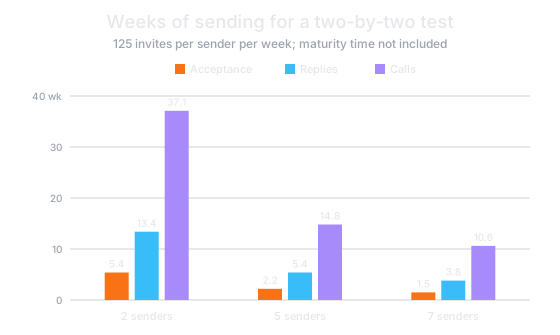
So with two senders at the lower pace, you need about five weeks to compare acceptance and over eight months to compare calls. That's why this guide uses acceptance and replies to decide early, and calls to confirm.
With only two senders, shrink the test. Run two cells instead of four, for example two ICPs with the same angle. That halves every figure: about three weeks to compare acceptance at the lower pace.
A few hundred invites per version only catches big gaps
You'll often hear a rule of thumb of a few hundred invites per version. The formula shows what that buys. Telling 10% replies per invite from 20% takes about 200 invites per version, so a few hundred is enough for gaps of around 10 points.
It isn't enough for a copy tweak. Telling 27% acceptance from 29% takes about 7,900 invites per version. Even in a two-version test, that's about six months of five senders' whole budget.
Step 4: Set up one campaign per ICP and angle
Run each cell as its own campaign and name it "ICP – angle". Then keep every other setting the same in every cell:
- the same sending window and working days;
- the same number of follow-ups, with the same delays;
- the same weekly pace per sender;
- the same start date, so no cell gets a better week.
Keep each lead in one cell only. A lead who gets two angles from two campaigns spoils both. Check that no one on your team is already in touch with a lead through another campaign.
Qualify leads the same way in every cell. If one list is hand-picked and the other is a raw export, the test measures list quality, not the ICP.
Write the hypothesis down before launch. One line per comparison is enough: what you expect, on which number from Step 2, and at what sample size from Step 3. For example: "RevOps – cost beats CFO – cost on acceptance by 10 points; decide at 340 matured invites each."
Step 5: Send every cell from every sender
Every sender should send every version, unless the sender is part of the test. The fair way to do that is to assign versions at random lead by lead, not account by account.
There are two ways to take the sender out of the result. You can run both versions from one account, or spread both across every sender. One account means one profile's invites, so with five senders you'd wait five times longer.
When each lead gets a version by coin flip, each sender's leads split about evenly between versions. A strong profile then lifts both versions equally. Ask how your tool assigns versions. If it assigns them per account, version A and version B are also comparing two people.
ICP comparisons need one extra check
You can randomize which version a lead gets. You can't randomize which ICP a lead belongs to. Two ICP lists can differ in warmth: mutual connections, past contact, a shared industry. We'd expect warmer leads to accept more, whoever sends.
That matters more if your tool picks the sender for each lead, for example the one with the most mutual connections. The warmer list then also gets its best-connected senders. A "winning" ICP may simply be the list your team already knows.
Run two checks:
- Compare the ICPs within bands of mutual connections, such as none, one to five, and six or more. Bands are a consistency check, not separate tests, so expect them to bounce more.
- Later, confirm the gap at replies and calls, not only at acceptance.
When the sender is part of the message
Sometimes the sender is the point. A founder writing to founders, or your CTO writing to CTOs, makes the sender part of the message. Then the sender belongs inside the cell, not spread across it.
Name such cells so nobody misreads them later, for example "Founders – peer (sent by CEO)". When that cell wins, you've learned something about the pairing, not about the copy.
Step 6: Read the results once a week
One table, updated on the same day each week, keeps the test honest. Give each cell one row. Inside each cell, add one row per sender, so one strong profile can't hide in the total.
| Cell | Sender | Invites (matured) | Accepted | Replied | Positive | Calls | Status |
|---|---|---|---|---|---|---|---|
| RevOps – cost | all | count | % of invites | % of invites | % of invites | count | Too early / Ready to decide |
| RevOps – cost | each sender | count | % of invites | % of invites | % of invites | count | Too early / Ready to decide |
Leave out profile views, likes and total actions. They count activity, not results, and they tempt you to call a winner early.
Our free LinkedIn outreach tracker template builds the per-cell part of this table from a weekly log. It counts only matured invites and checks acceptance per sender.
Read the table with whoever writes the messages. Once a comparison is ready, decide in that meeting, using the rules below. Write the result into the sheet: a winner, or no clear winner.
Step 7: Call a winner or drop a cell
Decide at the sample size you set before launch, after the results have matured. Never decide on the day a number looks good.
- Set the size before you start. Use the table in Step 3 for the difference you care about.
- Drop a cell early only for a big, steady gap. Wait until each cell has its planned matured invites, about 340 in the Step 3 table. Then stop any cell that trails by 10 or more acceptance points. Move its budget to the others.
- "Early" means before replies and calls have matured.
- "Steady" means the gap holds in every slice you can check: both angles for an ICP comparison, both ICPs for an angle comparison. For ICP comparisons, it must also hold within mutual-connection bands.
- Accept "no clear winner" as a result. If you reach the planned size and the gap is small, the versions are about equal for your purposes. Keep the one that's easier to run.
- Change one thing per round. The next round tests a new angle against the winner, not five changes at once.
- Re-test winners later. Your buyers hear the same pitch from other senders too, so a winning message can wear out.
Keep the sending accounts healthy during a test
A test is not a reason to raise the pace. Run it inside the same weekly limits as the rest of your outreach.
LinkedIn describes what happens when you push past its limits. An invitation restriction "typically lasts one week" (LinkedIn Help, retrieved 2026-10-25). With too many outstanding invitations, you may have to wait up to a month (LinkedIn Help, retrieved 2026-10-25). After you withdraw an invitation, you can't resend it to that person "for up to three weeks" (same page).
Two habits follow. Don't let pending invites pile up in any cell. Don't plan a "re-invite" step inside a test, because a withdrawn invite can't come back for weeks.
LinkedIn's User Agreement also bans automation. Section 8.2 lists "bots or other unauthorized automated methods" among the things members must not use (LinkedIn User Agreement, effective 3 Nov 2025). Its help pages say tools that "automate activity on LinkedIn's website" violate the agreement (LinkedIn Help, retrieved 2026-10-25). Any account that sends automated outreach can be restricted. Everyone whose profile sends should know that before it joins a test.
Example: a five-sender test, week by week
Here's the whole plan for five senders at the lower pace of 125 invites a week each. The rates are the example rates from Step 3, so your weeks will differ.
| Weeks | What happens | Invites |
|---|---|---|
| 0 | Write four hypotheses. Build four lists of the same quality. Name four campaigns "ICP – angle". | none |
| 1–4 | All five senders send to all four cells, with cells assigned per lead. | 625 a week in total, about 156 per cell; about 625 per cell by the end of week 4 |
| Early in 5 | Once about 340 invites per cell have matured on a 14-day window, compare acceptance within mutual-connection bands. Say ICP B trails by 10+ points in both angles, in every band: stop both ICP B cells. | ICP B cells end at a little over 625 each |
| 5 | The whole budget goes to the two ICP A cells, until each passes 840 invites, the reply sample size from Step 3. Then it returns to your main campaign. | about 313 per cell a week |
| 7 | Replies have matured on the same 14-day window. Compare replies per invite between the two angles for ICP A. | none |
| 8 onward | Run the winning angle as your main campaign. Log every call. Start the next round: one new angle against the winner. | your normal pace |
Stopping ICP B early saves about 380 invites in this round, roughly 0.6 weeks of the budget. That's a budget call. ICP B might still work with a different angle, and a later round can test it on replies. From then on, every test invite goes to the ICP A cells.
Calls come in throughout, but they don't decide this round. A fair comparison of calls across all four cells would take about 15 weeks of the whole budget. Watch that calls per invite on the winner aren't falling.
Frequently asked questions
How many invites per version before a result is reliable?
It depends on the size of the difference you want to see. With a 27% acceptance baseline, a 10-point gap needs about 340 invites per version, and a 5-point gap about 1,300. Rules of thumb of a few hundred per version only work for big gaps.
Can I test two versions on two different accounts?
Not fairly. Each account then tests both a message and a person. Assign versions per lead across the same senders instead. The exception is a test of the sender itself, such as a founder-to-founder cell.
Should I test the ICP or the message first?
Test the ICP first, holding the message constant. Who you write to usually changes results more than how you phrase the invite. That's reasoning, not a published measurement, so check it in your own results.
What is a good connection acceptance rate?
LinkedIn doesn't publish one, and any published figure depends on which invites it counts and over which window. Measure your own instead: accepted invites divided by invites sent, counting only invites at least 14 days old. Then compare your cells with each other, not with someone else's average.
How we calculated the numbers
Sample sizes use the normal approximation for comparing two independent proportions, at 95% confidence (two-sided) and 80% power. The approximation needs at least five successes and five failures in each group (OpenStax, Introductory Statistics 2e, section 10.3, retrieved 2026-10-25).
The tables use 7.849 for (1.96 + 0.84)², from unrounded constants, so the printed formula can come out a few invites lower.
Weeks equal four times the per-version sample size, divided by senders times weekly pace.
The noise figures in Step 3 come from the standard error of a rate. For 27% on 300 invites it's √(0.27 × 0.73 ÷ 300), about 2.6 points. The gap between two such months has a standard error of about 3.6 points. So a gap of five points or more happens by chance about one month in six, and seven or more about one in twenty.
All rates in this guide are round examples, not measurements.
Sources
- Types of restrictions for sending invitations, LinkedIn Help: invitation limits, outstanding invitations and the three-week resend wait.
- Invitation limit reached, LinkedIn Help: how long an invitation restriction typically lasts.
- User Agreement, LinkedIn, section 8.2, effective 3 Nov 2025: the ban on bots and unauthorized automated methods.
- Automated activity on LinkedIn, LinkedIn Help: third-party tools that automate activity.
- How can we determine whether two processes produce the same proportion of defectives?, NIST/SEMATECH e-Handbook, section 7.3.3: the two-proportion test.
- Comparing Two Proportions – Sample Size, Select Statistical Consultants: the sample-size formula.
- Comparing two independent population proportions, OpenStax: conditions for the approximation.
All sources were last checked between 2026-10-25 and 2026-10-27.
About this guide
This guide was written by the Relinta team. We make Relinta, a tool for running LinkedIn outreach across several sender profiles. You can reach us at support@relinta.com.
Drafted with AI help, then checked and edited by the Relinta team. LinkedIn's User Agreement prohibits automated activity. Any account used with Relinta can be restricted.